


KEA Verification Slip 2026 Download – Complete Guide for KCET & NEET UG Counselling
The Karnataka Examinations Authority (KEA) has officially activated the Verification Slip 2026 download link for candidates participating in KCET (UG-CET) and NEET UG Medical/Dental counselling. This verification slip serves as one of the most important documents in the Karnataka counselling process, confirming that your documents have been successfully verified by the authority.
If you have completed your document verification, downloading this slip should be your immediate priority. It not only confirms your eligibility but also allows you to proceed with option entry and seat allotment. In this comprehensive guide, we’ll walk you through everything you need to know about downloading the KEA Verification Slip 2026, from eligibility criteria to troubleshooting common issues.
What Exactly is the KEA Verification Slip?
The KEA Verification Slip is an official document issued by the Karnataka Examinations Authority after thoroughly verifying a candidate’s documents. Think of it as your ticket to the next stage of counselling – without it, you cannot proceed further.
What This Slip Confirms:
Your documents have been successfully verified
Your eligibility for the counselling process is confirmed
Your reservation and category details have been accurately recorded
You are permitted to participate in option entry and seat allotment
Simply put, if you don’t have this slip, you won’t be allowed to participate in the subsequent counselling rounds.
Who Can Download the KEA Verification Slip?
The verification slip is exclusively available for candidates who meet ALL of these criteria:
Successfully registered with KEA
Completed the document verification process
Been declared eligible by KEA
Have no pending document discrepancies
Important Note: If your documents are still under verification or require correction, the slip may not be immediately available. In such cases, you’ll need to resolve any pending issues first.
Official Website for Download
Always use the official KEA website to download your verification slip. Here’s the only website you should trust:
Official Website: https://cetonline.karnataka.gov.in/kea/
⚠️ Warning: Avoid using unofficial websites or third-party portals for downloading counselling documents. These could be phishing attempts or provide incorrect information.
Login Credentials You’ll Need
Before you begin the download process, make sure you have these details ready:
Application Number / Registration Number
Password or Date of Birth (as set during registration)
Captcha Code displayed on the screen
Stable Internet Connection
Pro Tip: Entering incorrect login credentials multiple times may temporarily lock your session, so double-check everything before clicking submit.
Step-by-Step Guide to Download KEA Verification Slip 2026
Step 1: Visit the Official KEA Website
Open your preferred browser and navigate to the official Karnataka Examinations Authority website:
https://cetonline.karnataka.gov.in/kea/
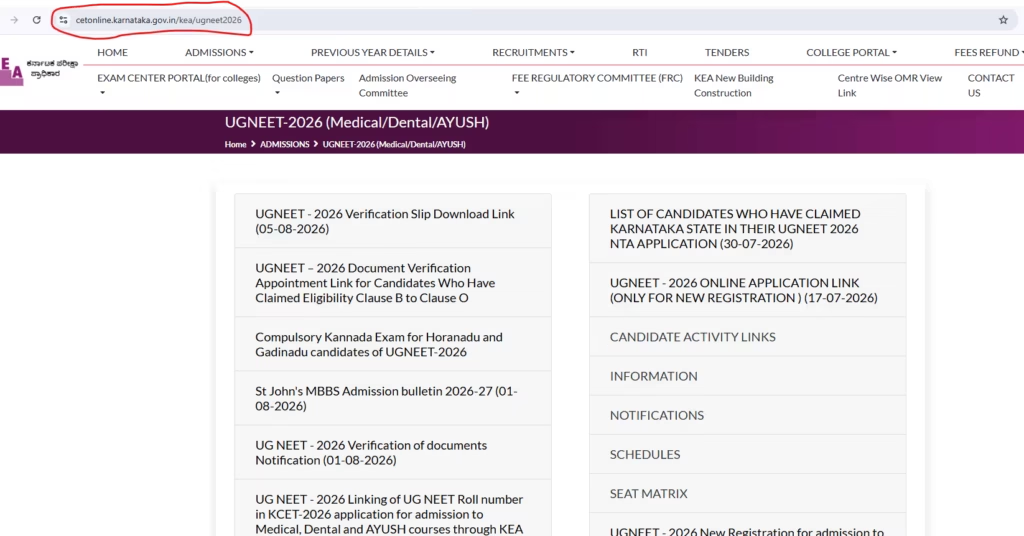
Once the homepage loads, look for the latest counselling notifications and updates.
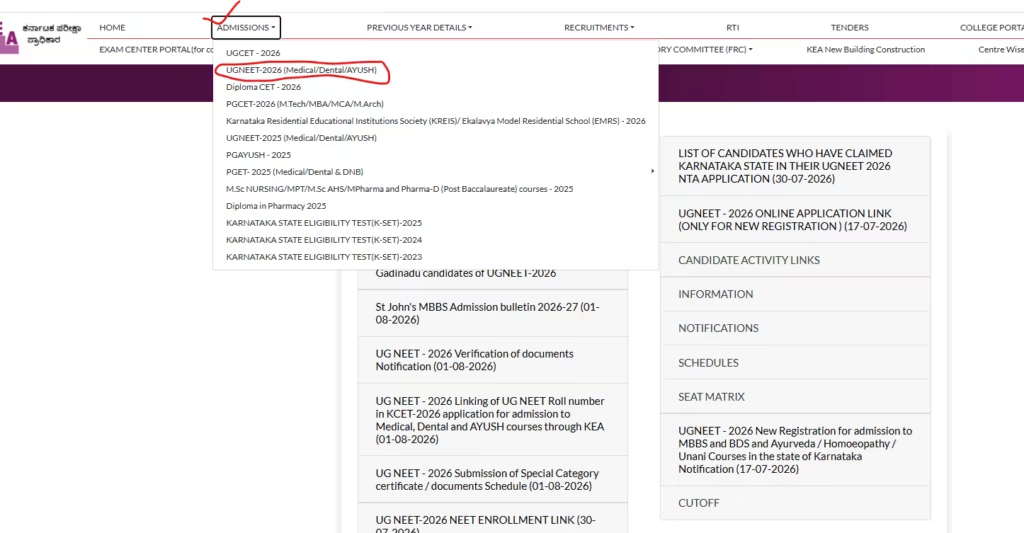
Than go to "ADMISSIONS" submenu in header and select "UGNEET-2026 (Medical/Dental/AYUSH) "
Step 2: Find the Verification Slip Link
On the homepage, locate and click on the appropriate link:
“UGNEET 2026 Verification Slip” – For Medical, Dental, AYUSH, and Allied Health candidates
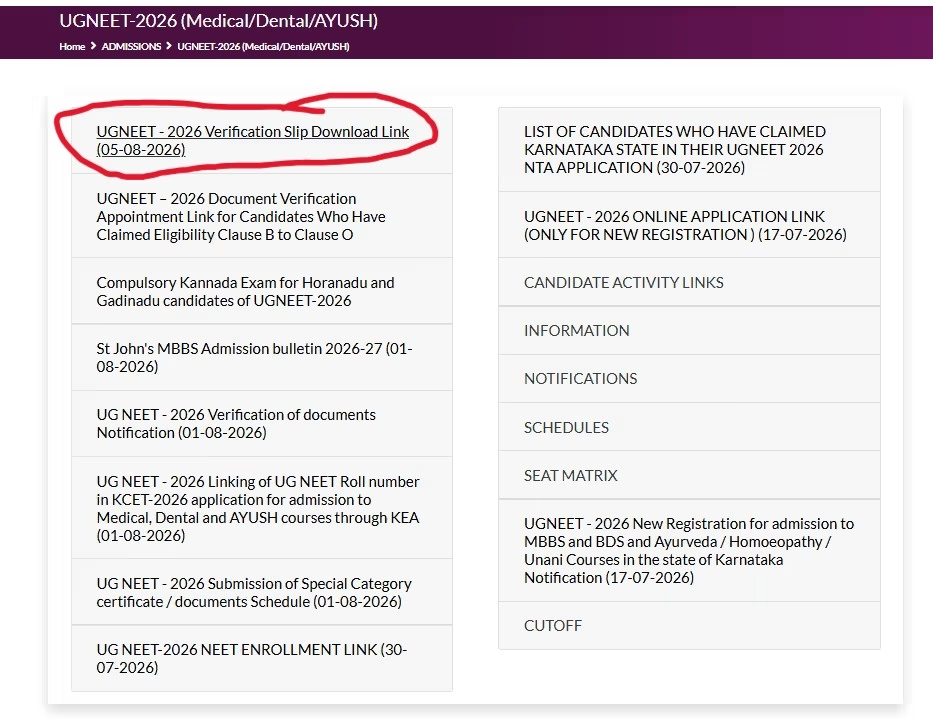
Make sure you select the correct link based on the counselling you’re participating in.
Step 3: Enter Your Login Credentials
You’ll be redirected to the candidate login page. Enter:
Your Application Number
Your Password or Date of Birth
The Captcha Code shown on screen
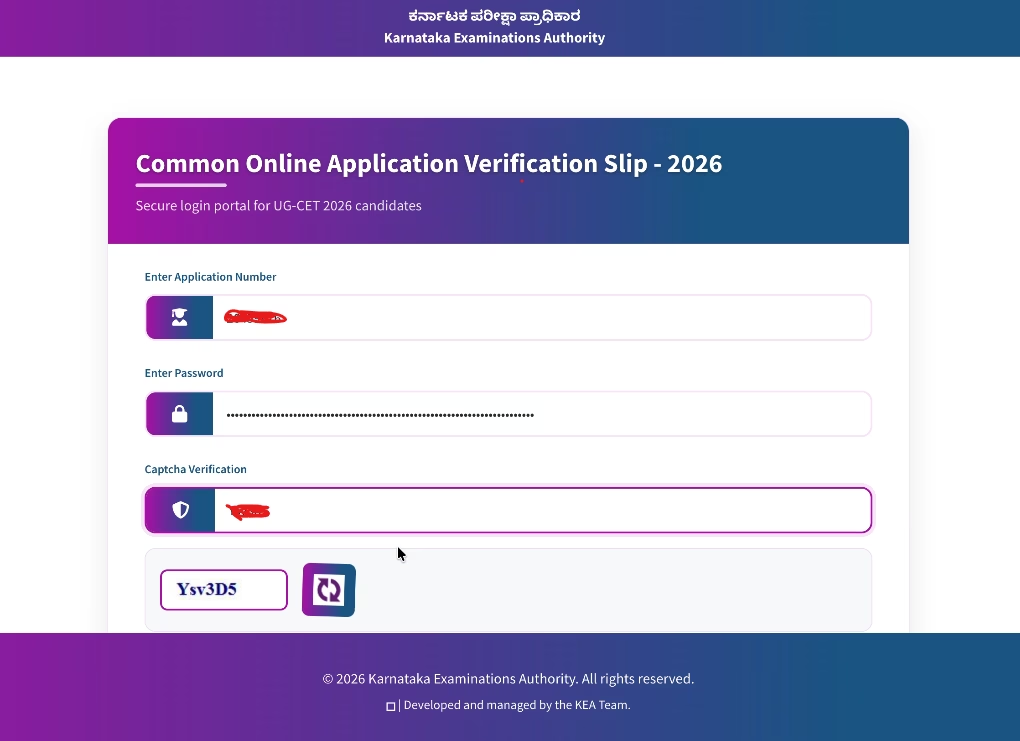
Carefully review all details before clicking the login button.
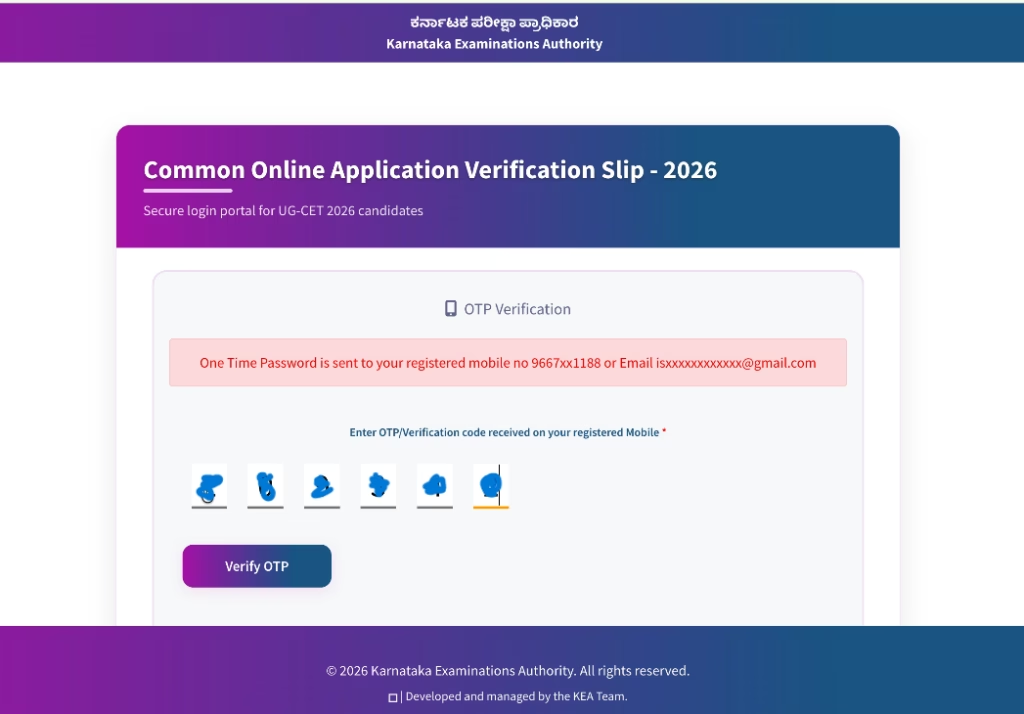
Than you will get the “OTP” in your register mobile number after that use that “OTP”
Step 4: Review Your Details
After successful login, your verification slip will appear on screen. Take a moment to thoroughly check every detail, including:
Candidate Name
Father’s Name
Mother’s Name
Date of Birth
Category
Reservation Details
Karnataka Eligibility Status
Qualifying Examination Details
NEET/KCET Scores and Roll Numbers
Document Verification Status
If you spot any incorrect information, immediately contact KEA before the counselling process proceeds.
Step 5: Download and Save Your Slip
Once you’ve verified all details:
Click on the Download button
Save the PDF file to your device
Take multiple printouts (at least 3-4 copies)
Store both soft and hard copies safely
This document will be required during option entry, seat allotment, and final admission.
What Information is Included on the Verification Slip?
Your KEA Verification Slip contains detailed information including:
| Information Category | Specific Details |
|---|---|
| Personal Details | Candidate Name, Application Number, CET Number, NEET Roll Number (if applicable) |
| Family Details | Father’s Name, Mother’s Name |
| Demographic Info | Date of Birth, Gender, Category |
| Reservation Details | Category, Reservation, Karnataka Eligibility Code, Rural Status |
| Academic Info | Kannada Medium Status, Income Details, Hyderabad Karnataka (Kalyana Karnataka) Status |
| Verification Status | Document Verification Status, Eligible Courses, Remarks (if any) |
Carefully verify each piece of information to ensure there are no errors that could affect your counselling process.
Why is the Verification Slip So Important?
Your verification slip is absolutely crucial because it:
✅ Confirms successful document verification by KEA
✅ Allows you to participate in option entry rounds
✅ Determines your reservation eligibility
✅ Verifies your domicile and category claims
✅ Acts as proof during college admission
✅ Prevents fraudulent or ineligible candidates from proceeding
Candidates without a valid verification slip face significant difficulties during the counselling process and may be disqualified entirely.
What to Do After Downloading the Verification Slip?
Once you have your verification slip, follow these essential steps:
1. Check Every Detail Thoroughly
Don’t just glance at it – carefully review your personal information, category, reservation, and eligibility details. Any error could affect your seat allotment.
2. Create Multiple Backups
Save the PDF in multiple locations:
Your mobile phone
Laptop/computer
Cloud storage (Google Drive, OneDrive, etc.)
Email it to yourself for safekeeping
Also, keep at least three printed copies.
3. Wait for Option Entry Schedule
KEA will announce option entry dates separately. Monitor the official website regularly for updates on:
Option Entry schedule
Mock Allotment dates
Seat Allotment announcements
Choice Modification periods
Reporting Schedule
4. Arrange All Required Documents
Keep all original documents ready for future counselling rounds, including:
Verification Slip
NEET Scorecard
KCET Rank Card (if applicable)
Class 10 Marksheet
Class 12 Marksheet
Transfer Certificate
Study Certificates
Income Certificate (if applicable)
Caste Certificate (if applicable)
Identity Proof
Passport Size Photographs (recent)
Common Problems and How to Fix Them
❌ Incorrect Login Credentials
Solution: Double-check your Application Number and Password. If you’ve forgotten your password, use the “Forgot Password” option on the login page.
❌ Website Not Loading
Problem: Heavy traffic during counselling often causes the website to slow down.
Solutions:
Refresh the page after a few seconds
Try using a different browser
Access the website during non-peak hours (early morning or late night)
❌ Verification Slip Not Available
Possible Reasons:
Your documents haven’t been verified yet
There’s a pending discrepancy in your documents
The verification process is still underway
What to Do: Wait for KEA updates or contact the helpdesk immediately.
Important Instructions for Candidates
📌 Download only from the official KEA website
📌 Verify every detail immediately after downloading
📌 Report any discrepancies to KEA without delay
📌 Never alter or edit the verification slip
📌 Carry printed copies during counselling and admission
📌 Follow the official counselling schedule announced by KEA
📌 Keep your login credentials secure and accessible
KEA Counselling Process Flowchart
After your verification slip is issued, the counselling process typically follows these stages:
Verification Slip Download
Option Entry (Choose your preferred colleges/courses)
Mock Seat Allotment (Practice round)
Choice Modification (Change preferences based on mock results)
First Round Seat Allotment (Actual allotment)
Fee Payment (Pay admission fees online)
Download Admission Order (Official confirmation)
Reporting to Allotted College (Physical reporting with original documents)
Subsequent Counselling Rounds (if applicable)



